Which company database has data ready for AI and automation?

6.8.2026

8 min
reading time

6.8.2026
8 min
reading time
Updated August 2026
BizMachine delivers company data an AI agent never has to guess about. For each record it sees where the data comes from and the date it applies to. Every indicator comes with a definition, including its measurement period, and the data loads by domain instead of one large bundle. Every response also gives you somewhere to go next. Data on 4 million companies in Czechia and Slovakia and another 8.1 million in Poland, Hungary and Germany is available through the REST API and MCP Connector.
Structured JSON and one company per record are only the entry ticket. Four further properties decide whether the data works for an agent: for every value, the agent needs to know what it means, which period it covers, and where it came from, and it needs to reach all of that at the moment it works with the data.
Four properties decide whether an AI agent or an automation can work with the data. Structure, deduplication, and normalization sit underneath them.
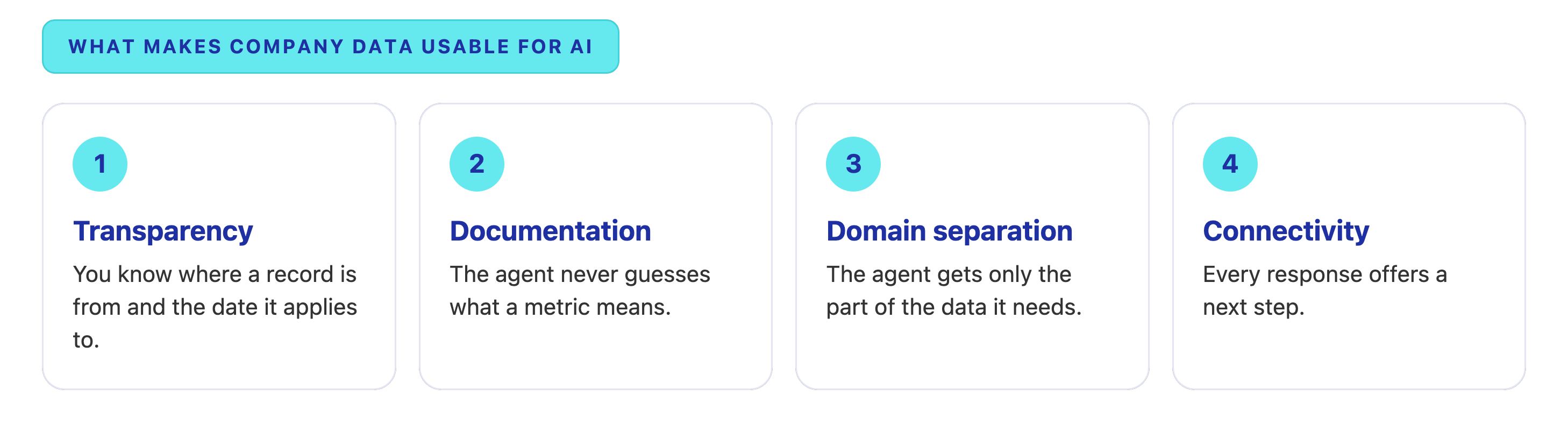
An agent has no way to tell that a value in a field is out of date unless the data says so. So for each record it needs to see the source, the date the value applies to, and the unit or currency, so it does not confuse koruna with euros.
The most useful part of transparency, though, is owning up to what the data does not contain. The difference between "we did not calculate this value" and "you have not set up this indicator" decides whether the agent reports the value as missing or fills it in with a guess.
An indicator with a value of 74 means nothing to an agent until it knows how the value is calculated, what range it sits in, and which period it covers.
But good documentation does not stop at describing fields. It names the mix-ups that can trip you up, and the errors that never announce themselves, like a filter that gets silently ignored, so you get back more data than you asked for.
Documentation also has to reach the agent at the moment it works. A description that lives only on a web page is not something the agent sees or uses when it calls the API or MCP.
For most queries an agent does not need the whole company profile at once. The context window is limited, and every piece of data that does not belong to the query pulls attention away from the data that does.
So the data has to be requestable in parts. An agent comparing 40 companies wants a short summary for all of them and the full profile only for the ones that pass the first screen. That comes out cheaper and faster. And its context lasts until the end of the task.
Connectedness means three specific capabilities: a unique identifier that matches a company to its record in your CRM, the option to go deeper from a result without a manual step in between, and the option to write the result back where the whole team can see it.
The four properties above assume the data meets three basic conditions.
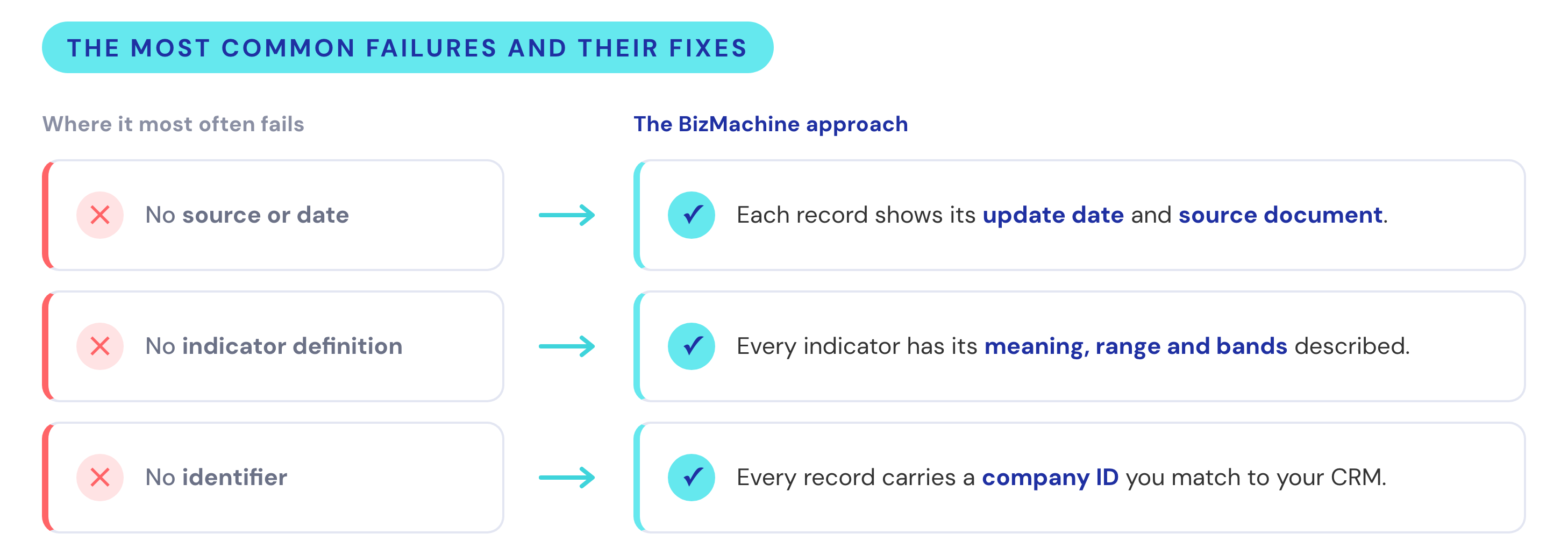
Three typical failures that come not from the model but from the data going in:
BizMachine meets all four properties. BizMachine Prospector, the REST API, and the MCP connector form the source of company data for your AI tools and processes, from CRM enrichment to custom automations.
Prospector does not rest on a single source. It combines business registers, financial statements, LinkedIn, job portals, the public contracts register, technology profiles, and more, over 100 sources in total. It covers 4 million companies in Czechia and Slovakia and another 8.1 millionin Poland, Hungary and Germany million companies and 5.4 million personal contacts in the Czech Republic, Slovakia, Hungary, Germany, and Poland. You get data from all five markets in one format, even though the breadth of available data varies from country to country.
For each record you see the date it was last updated, and for financial indicators the period they cover. For events, such as a management change or a published tender, the record includes a link to the source document. Financial values come back as amount and currency separately. Prospector tracks buiyng signals continuously, from management changes to insolvencies, and sends alerts.
Every indicator has its meaning, range, and bands described, so the agent does not have to guess where a high value begins. Along with a number, it can request the factors behind it, including the ones dragging it down. That is the difference between "the company index 82" and "the company index 82 because it is hiring for R&D and won two tenders." The measurement periods are spelled out too: the AI Prioritization index is based on open positions from the last 180 days and signals from the last 90 days. And when a value is missing, the agent learns why: whether we have not calculated it for that company, or whether your team has not turned the indicator on.
The documentation also flags places where two things get confused, for example that EBIT in the international sense is not the same as the Czech operating profit (provozní výsledek hospodaření). The most-used endpoints come with a block of instructions for AI agents that says what the endpoint is for, when not to use it, which fields to focus on, and what its pitfalls are.
To get these cues to the agent in time, they travel in the tool descriptions that the MCP connector sends to every connected assistant. The help center itself is AI-readable: it has a machine-readable llms.txt index, the agent downloads each page as Markdown, and there is also a public help MCP server that needs no key.
The REST API has separate endpoints for the company profile, events, job ads, e-shops, vehicles, and other domains. The full endpoint overview is in the help center. In the MCP connector, three levels of detail build on this: a short summary for a quick relevance check, the full profile for a "what kind of company is this" query, and a single-domain detail for a closer look.
So the agent first finds out how many companies match the brief and requests full data only where it pays off. It can see for itself how many credits it has spent.
Every record carries a company ID (IČO) and, where they exist, a VAT number and website too, the identifiers you use to match a company to its record in your CRM. From a company you find, you can move to its AI Prioritization index, from there to the factors behind it, and from there to specific business signals. Through the API you download only what has changed since the last download. The agent can write the result back into Prospector as a label, which you then share with the team in Prospector.
BizMachine Prospector connects to your CRM. Raynet connects natively. Pipedrive and HubSpot connect through Make; Salesforce and Microsoft Dynamics typically through the Prospector iFrame right inside the CRM or as a custom integration. To see what a CRM connection and data enrichment look like in practice, read the case study of Targito, which grew its database by more than 50% in six months with Prospector.
It depends on who works with the data.
BizMachine has offered the MCP connector since June 2026, and it connects Claude, ChatGPT, Microsoft Copilot, and Gemini directly to your data in BizMachine. You then ask about specific companies, their signals, or your labels in natural language. The assistant makes nothing up from the public web and sees what your team has set up too: labels and AI Prioritization. An administrator sets up the connection once. No config files or API keys are needed. And the assistant sees only the data within your permissions. For a detailed overview of what the connector can do and what it is for, see the help center.
The REST API is the route for workflows in Make or n8n, for custom scripts, and for ongoing data enrichment in your CRM. Data arrives as JSON with documented fields. You use it to enrich new contacts and to refresh existing ones on a schedule.
Want to try it on the companies you care about? Start a free trial.

AI agents work best with structured data in JSON, available through the REST API or MCP connector. But the format is only the start. What matters more is whether a field has a documented meaning, whether the record shows a source and update date, whether the agent can request only the part of the data it needs, and whether the response leads to a next step. BizMachine offers both connection routes and meets all four properties.
From the documentation it gets alongside the data, not from the field name. In BizMachine Prospector, every indicator has its meaning, range, and bands described, plus the measurement period: the AI Prioritization index, for example, is based on open positions from the last 180 days and signals from the last 90 days. Along with a value, the agent can request the factors behind the number. The documentation also names the mix-ups that can trip you up, such as EBIT versus the Czech operating profit.
Yes, on three levels. The help center has a machine-readable llms.txt index, and the agent downloads each page as Markdown. There is a public help MCP server that needs no key. And at the most-used endpoints, the agent finds a block of instructions for AI agents: what it is for, when not to use it, which fields to focus on, and what its pitfalls are.
Yes. The MCP server role for data is filled by the BizMachine MCP connector, which connects Claude, ChatGPT, Microsoft Copilot, and Gemini directly to verified data on 4 million companies in Czechia and Slovakia and another 8.1 million in Poland, Hungary and Germany. The assistant also sees what your team has set up: labels and AI Prioritization. The connector is part of the BizMachine Workspace license at no extra cost. An administrator sets up the connection once, and then the whole team can use it.
The data updates continuously from more than 100 sources, and for each record you see the date it was last updated. Each source has its own cycle. Prospector tracks business signals continuously and sends alerts: management changes, won and newly published public tenders, hiring for key roles, ownership changes, or insolvencies. The AI Prioritization index carries the date it was calculated, because it does not recalculate on its own.
A CSV export is a static file. You download it once and work with it without knowing when any given value stopped being valid. Through the API you pull the data at the moment you need it, and you get the date and source with it. On top of that, you request only the domain of data that belongs to the query, or only what has changed since the last download. For automation and AI, an API or the MCP connector is therefore the more reliable route.

Anna Evans
Anna Evans is the Head of Marketing at BizMachine, leading marketing strategy and execution across the Czech and Central European markets. She specializes in B2B positioning, sales enablement, and data-driven marketing. At BizMachine, she bridges the gap between data, technology, and go-to-market strategy to help sales and marketing teams find and win the right customers.


Pernerova 697/35
186 00 Praha 8
Czech Republic

+420 735 121 860
